SEO & AEO Optimizer
The SEO Optimizer is OmniRank’s command center for scaling your AI Engine Optimization (AEO) and traditional SEO efforts. Instead of updating pages one by one, this workspace allows you to bulk-audit, generate enhancements, and inject structured data across your entire web presence.
The interface is divided into three distinct tabs to match your workflow:
- Batch Shopify Product Optimizer
- Batch WordPress Post Optimizer
- All-in-One Content Editor
1. Batch Shopify Product Optimizer
The Shopify AI-SEO Batch Workspace is designed for e-commerce brands needing to optimize large catalogs for AI search engines (like ChatGPT, Gemini) and traditional Google search.
This tool queries, evaluates, and injects SEO tag adjustments alongside dedicated LLM Citation Summarization structures across your active Shopify products index.
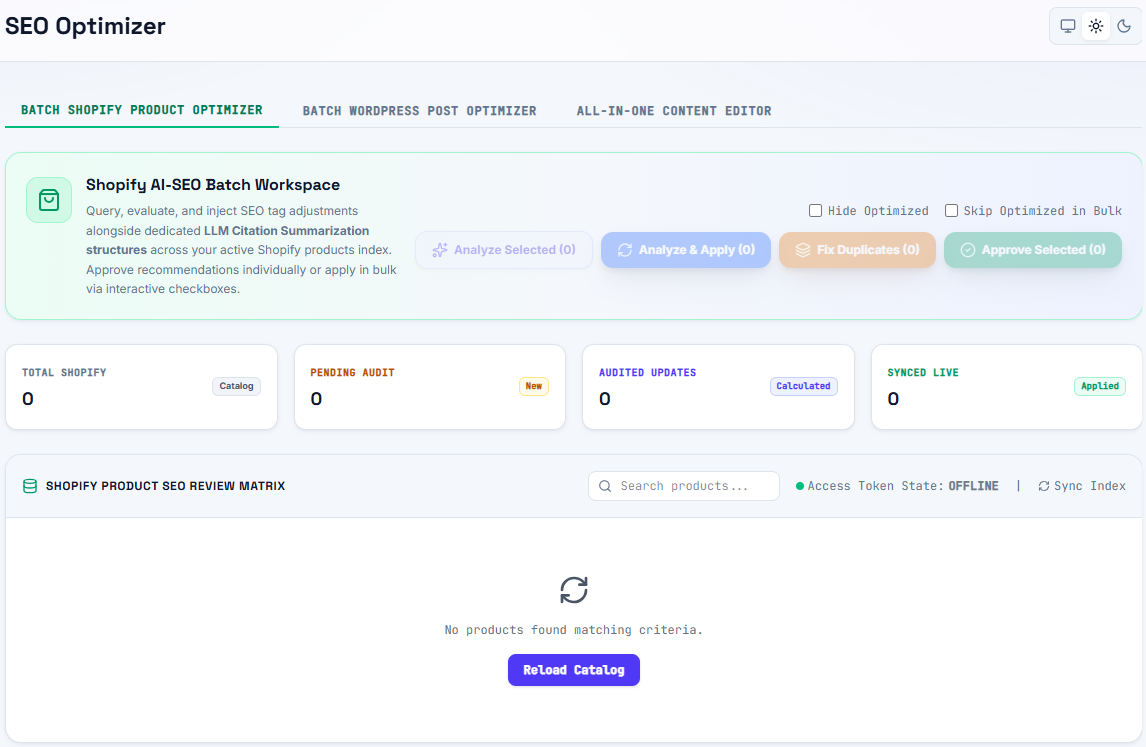
Dashboard Overview
- Total Shopify (Catalog): The total number of products currently indexed in your connected Shopify store.
- Pending Audit (New): Products that have been imported but not yet analyzed by OmniRank's AI.
- Audited Updates (Calculated): Products that have been analyzed and have pending SEO recommendations waiting for your approval.
- Synced Live (Applied): Products where optimized metadata and citation blocks have been successfully pushed live to your Shopify store.
Key Actions
Use the interactive checkboxes in the Shopify Product SEO Review Matrix to select items, then apply bulk actions:
- Analyze Selected: Runs the AI audit on the chosen products to generate recommendations (does not push live).
- Analyze & Apply: Runs the audit and immediately queues the updates to sync with your store.
- Fix Duplicates: Automatically identifies and resolves duplicate SEO tags or content issues across the selected batch.
- Approve Selected: Pushes previously calculated (Audited) recommendations live to your store.
Use the Hide Optimized and Skip Optimized in Bulk checkboxes in the top right to keep your workspace clean and prevent accidentally overwriting previously optimized products.
Ensure your Access Token State (located above the matrix) reads as ONLINE. If it displays OFFLINE, you will need to re-authenticate your Shopify connection before syncing updates. You can also use the Reload Catalog button to manually refresh your product list.
2. Batch WordPress Post Optimizer
The WordPress AI-SEO Batch Workspace allows content teams to audit and optimize WordPress posts and pages for AI search visibility. This tool specializes in injecting structured citation blocks and SEO metadata in bulk, ensuring your informational content acts as a "Glass Box" for AI crawlers.
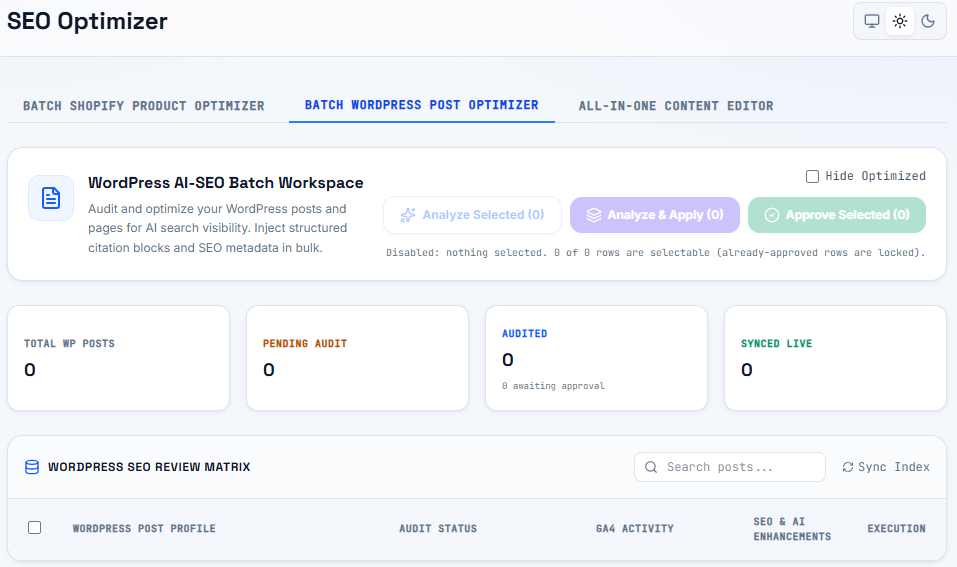
Dashboard Overview
- Total WP Posts: The total number of posts and pages indexed from your WordPress site.
- Pending Audit: Articles awaiting AI evaluation.
- Audited: Articles with generated SEO enhancements that are awaiting your final approval.
- Synced Live: Articles that have been successfully updated on your live WordPress site.
The WordPress SEO Review Matrix
The matrix provides a detailed breakdown of your content inventory:
- WordPress Post Profile: The title and basic details of the post.
- Audit Status: Indicates whether the post is Pending, Audited, or Synced.
- GA4 Activity: Integrates with your Google Analytics 4 data to show traffic context, helping you prioritize high-value pages for optimization.
- SEO & AI Enhancements: A preview of the suggested metadata and citation structure updates.
- Execution: Individual controls to approve or reject the suggested changes for a specific row.
Bulk Actions available for WordPress include Analyze Selected, Analyze & Apply, and Approve Selected. You can also use the Sync Index button to fetch the latest posts from your WordPress database.
3. All-in-One Content Editor
For businesses running both an e-commerce storefront and a content blog (e.g., a Shopify store with a WordPress blog on a subdomain), the All-in-One Content Editor unifies your workflow.
This tab merges the functionalities of both the Shopify and WordPress batch optimizers into a single, cohesive interface.
Benefits of the All-in-One view:
- Unified Pipeline: See your total pending audits across all platforms in one glance.
- Cross-Platform Strategy: Align your e-commerce product SEO with your informational blog SEO simultaneously, ensuring a consistent brand narrative for AI search engines.
- Streamlined Approvals: Content managers can approve product updates and blog updates in the same daily session without switching contexts.
Standard Optimization Workflow
Regardless of which tab you are using, the standard OmniRank batch workflow remains the same:
- Select: Use the checkboxes in the Review Matrix to select the rows you want to work on (or use the search bar to find specific clusters).
- Analyze: Click Analyze Selected to have the OmniRank engine calculate the ideal AEO/SEO structures.
- Review: Check the
Auditedcolumns to review the AI's recommendations. - Approve & Sync: Click Approve Selected to instantly inject the updates directly into your Shopify or WordPress backend.