Architect Mode: Step Up to the Drafting Table
We heard from Indie Devs scaling their businesses in the Bespoke Economy, and from Enterprise CTOs modernizing legacy systems, that they needed absolute architectural authority before letting an AI touch their codebase.
With the Architect Mode, Priset ingests your request, analyzes your codebase, and—instead of immediately writing code—presents you with multiple architectural approaches.
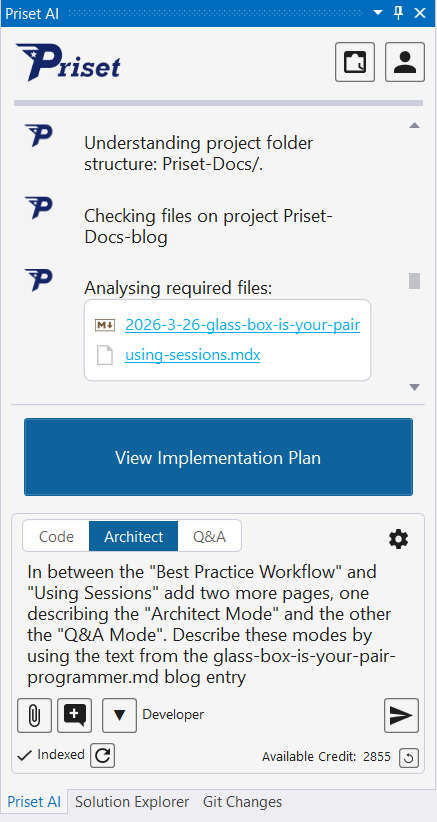
After clicking on the View Implementation Plan Button you will be presented with one or more architectural blueprints for revidew. It is also possible to edit the same by clicking on the little pencil icon (see below).
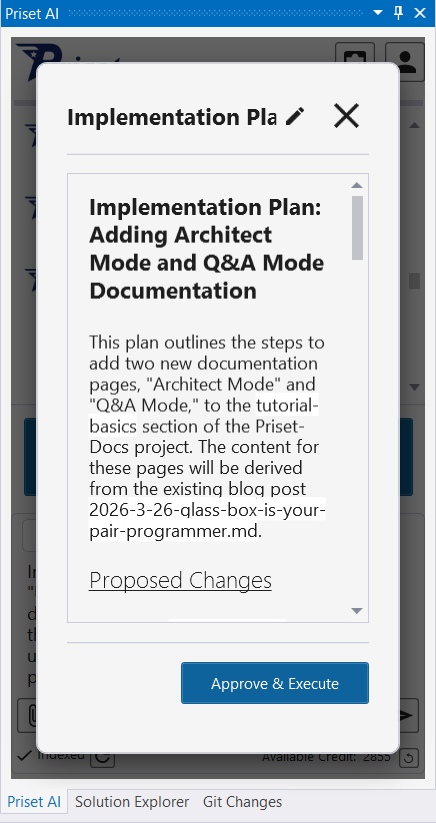
If there is more than one implementation option, Priset will show navigation buttons. Use the same to move from Implementation Plan to another. After reviewing, click on the Approve & Execute Button to direct Priset to execute the selected plan.
You review the blueprints. You select the best path. You make tweaks. And only then does Priset execute.
While it executes, you can see what is happening in real-time. You can stop, pause and correct the AI.
After AI finishes its work, you can ask questions about the code making sure the implementation is solid.