One post tagged with "devtools"

View All Tags

Your IDE Just Got a 100x Upgrade: Announcing Priset for VS Code

· 4 min read
Priset AI
The AI Engineering Partner

Your IDE is your sanctuary. It's where ideas become reality, where problems are solved, and where you, the developer, spend countless hours perfecting your craft. We believe that the most powerful tools shouldn't force you to leave that sanctuary. They should meet you right where you are.

Today, we're closing that gap. We are thrilled to announce the official launch of the Priset extension for Visual Studio Code!

You can now harness the full power of an autonomous AI engineering partner without ever leaving your editor. This isn't just about code completion; it's about embedding an entire, automated development lifecycle directly into your workflow.

But what does autonomous AI in your IDE actually look like?

Something like this:

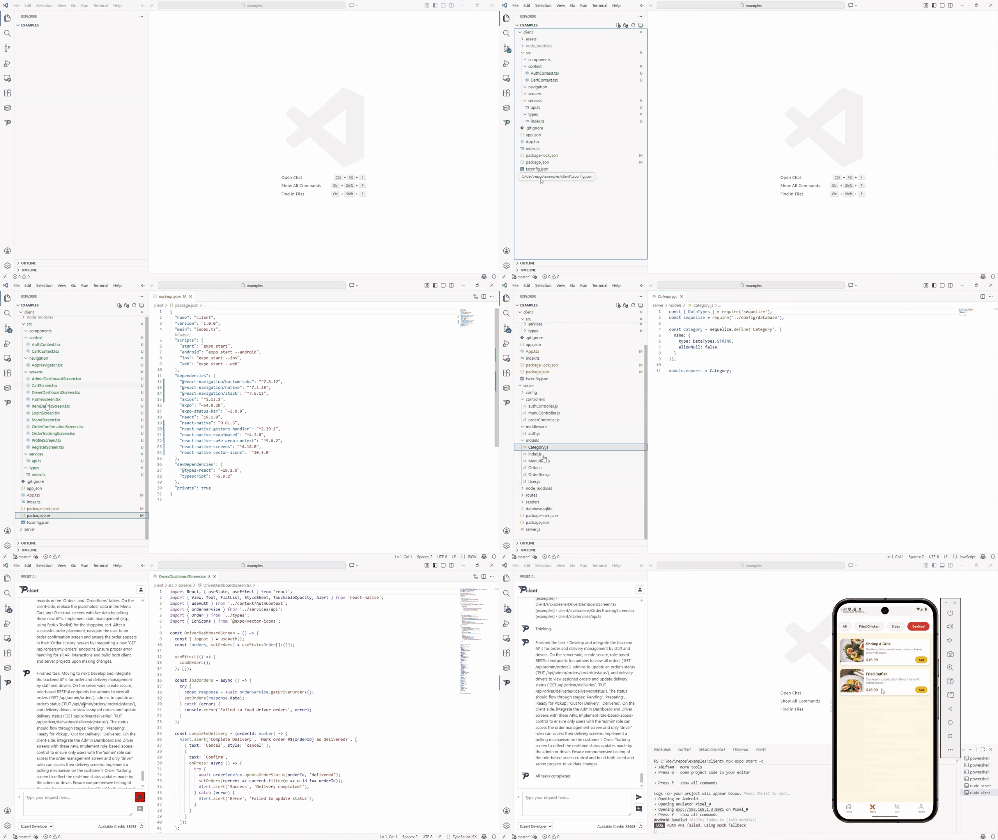
Priset building a native mobile app from a single prompt

From a Single Prompt to a Native App in 30 Minutes

The GIF above isn't a mock-up. It's a timelapse of a 30-minute process (duplicate frames removed) where we gave Priset a single, high-level prompt: "Create a native mobile app for my restaurant..."

No further instructions. No manual intervention.

Priset planned the architecture, scaffolded the project for both iOS and Android, generated the UI components, wrote the business logic, and delivered a functional MVP. It did in 30 minutes what would take an expert developer days, if not weeks, to accomplish.

You can watch the full timelapse video here to see the entire process unfold:

Why This Changes Everything

Bringing Priset into VS Code is more than just a new feature; it's a fundamental shift in how you'll interact with your code.

  • Your Autonomous Partner, Right Where You Work: No more context-switching between your editor and another application. Priset lives alongside your code, with full access to your project's context.
  • Stay in the Flow State, Permanently: The magic of "vibe coding" no longer has to break when you hit a complex problem. Maintain your creative momentum while Priset handles the heavy lifting of architecture, boilerplate, and testing.
  • Unleash AI on Your Existing Codebase: The true power of Priset is now available for your most complex, mature projects. Point it at a legacy system and ask it to refactor a service, or have it add a new, fully tested feature to your existing enterprise application.

What's Inside the Extension?

Our new VS Code extension puts our most powerful features at your fingertips:

  • Autonomous Agent Chat: Click to open a chat interface that understands your entire project. Assign high-level tasks, ask architectural questions, or have it fix complex bugs.
  • Full Codebase Context: Priset reads and understands your project structure to ensure all generated code is perfectly consistent with your existing patterns and style.
  • One-Click Test Generation: Highlight a function or an entire service and instruct Priset to generate a comprehensive suite of unit and integration tests, achieving near-100% coverage automatically.
  • Proactive Bug Fixes & Refactoring: Priset can not only fix bugs you point out but also proactively identify and suggest improvements and security patches for your code.

Get Started in 60 Seconds

Ready to turn your VS Code into a 100x development engine?

  1. Open Visual Studio Code.
  2. Navigate to the Extensions view (Ctrl+Shift+X or Cmd+Shift+X).
  3. Search for "Priset".
  4. Click Install.
  5. Follow the Login instructions here

That's it. You're ready to start building at the speed of thought.

Install Priset from the VS Code Marketplace

This launch is a huge milestone for us, but it's just the beginning. We're on a mission to build the ultimate tool to empower developers, and bringing that tool directly to your editor is a critical step.

We can't wait to see what you build with it.

Happy building,

  • The Priset Team