Best Practice Workflow
Always keep your code source controlled. That will enable you to selectively rollback the changes if you don't like what Priset did.
- Select Your Model: Ensure the AI Model/Type Dropdown is set to "Developer" for general tasks.
- Start a New Session: If you are starting a new task, click the New Session Button to clear the context. More info about using sessions is given in this article.
- Plan: For anything that looks more complex (e.g., full-stack scaffolding, legacy migrations, or intricate multi-file changes), select Architect Mode first to let Priset create possible implementation plans.
- Write Your Prompt: Clearly describe the task in the Prompt Input Box. If you used the Architect Mode review the proposed implementation plans.
- Execute: Click on the Run Button. If you used the Architect Mode approve and execute one of the proposed implementation plans.
- Review: Analyze the code diffs in the appropriate IDE windows to see if you like the changes made. Check the explanations in the Main Conversation Pane. Sometimes Priset will ask for user input as part of the conversation.
- Rollback: Undo the changes if you don't like them. You can also undo the changes selectively and keep those that you like.
- Test: Test your application to see if the new functionality works as expected.
- Fix: If things don't work as expected, use the same session to report the problem, exception, etc., and request Priset to fix them. You can attach screenshots, Word, or PDF documents that provide more details.
- Interrogate (Q&A Mode): Once the code is working, switch the Mode of Operation to Q&A Mode. Use this mode to interrogate the codebase against common code-review questions before finalizing. For example, ask Priset: "Are there any security vulnerabilities in the code we just wrote?", "Does this logic meet standard performance benchmarks?", or "Explain the time complexity of this new function."
- Check In: After successful testing and a clean Q&A review, check in the changes to your source control repository.
- Iterate: Continue the conversation with follow-up prompts until all tasks are complete.
AI is not infallible and it cannot / should not replace humans. If you see that Priset has started doing changes that you haven't anticipated you should hit the Stop button. You can then use the same session to clarify your prompt and provide more details or start all over. Check Using Sessions for more details.
Priset will automatically build the solution in order to check for build problems. Nevertheless, even if the solution builds properly it may have runtime errors and bugs. If you see that the runtime errors and bugs are related to the changes just made, use the same session to report them (so Priset would understand the context of the reported issues). Otherwise, when errors and bugs are not deemed related to the changes just made, report them in a new session. Check Using Sessions for more details. You can also use annotated screenshots to tell Priset what to change.
Running Commands with Priset
Priset is not just for writing code; it can also help you execute various commands directly from the prompt. This can streamline your workflow by allowing you to manage your environment, run scripts, and handle version control without leaving the IDE.
For example, you can ask Priset to:
- Run environment setup scripts (e.g.,
npm install,dotnet restore). - Execute build or test commands.
- Perform Git operations like checking status, staging files, or checking in the code.
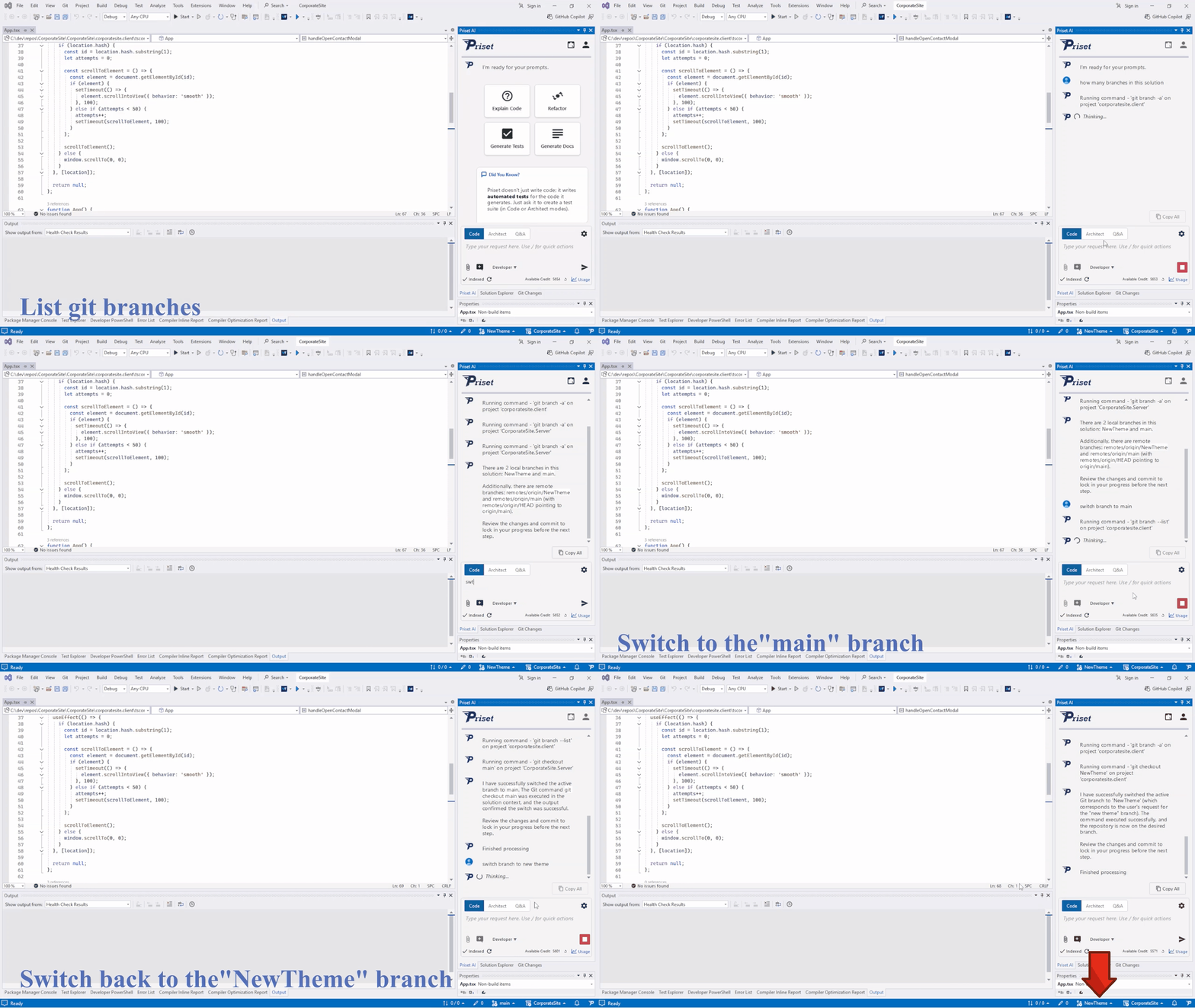
Here is an example of using Priset to manage Git branches. In the animation below, we ask Priset to list the branches for the current solution, switch to the main branch, and then switch back to the NewTheme branch.
By leveraging Priset for command execution, you can maintain your focus and context within the conversation, making your development process more efficient.