Project Persona - Setting Your AI Guardrails
While Priset is designed to understand your codebase's context automatically, every project has unwritten rules, specific constraints, and architectural preferences. The Project Persona feature allows you to define these essential guardrails, transforming Priset from a powerful AI agent into a true, project-aware engineering partner.
The Project Persona is a simple configuration file named helper.priset that lives in the root directory of your solution. By editing this file, you provide Priset with a persistent "system prompt" or set of instructions that it will adhere to for every action it takes within that specific solution.
This ensures consistency, enforces best practices, and gives you granular control over the AI's behavior, making it an indispensable tool for both individual developers and enterprise teams.
How It Works
First-Time Setup
The first time you open a solution with the Priset extension active, a notification will appear:
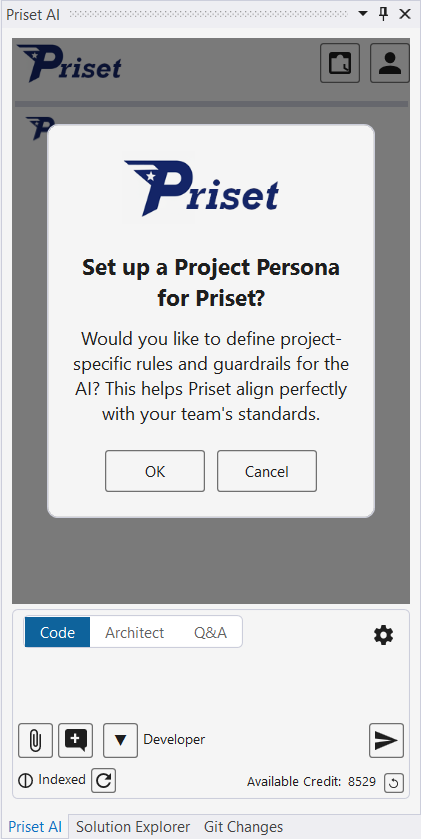
- OK: Clicking this button opens the
helper.priseteditor. Type your instructions or copy paste from the examples below. - Cancel: If you dismiss the notification, an empty
helper.prisetfile will be created silently in your solution's root directory. You can edit it manually at any time.
Once the helper.priset file exists, this initial prompt will not appear again for this solution.
Editing Your Project Persona
You can modify your project's guardrails at any time. To access the editor:
- Click on the My Account Button in the top right corner of the Priset Chat Window.
- Select the "Update Project Persona" option from the menu.
- The
helper.priseteditor window will appear, allowing you to add or change instructions.
Key Use Cases & Examples
The helper.priset file is a plain text file where you can write natural language instructions. Here are some powerful examples of what you can define.
1. Technology & Version Constraints
Ensure Priset uses the exact versions and technologies your project requires, preventing accidental upgrades or incompatible package installations.
# === Technology Constraints ===
Always use .NET 9 for new projects. Do not use any version higher than this.
For all Python projects, target Python 3.11. Do not use features from Python 3.12 or newer.
When adding new frontend dependencies, use npm, not yarn.
The preferred testing framework for this solution is xUnit. Do not use NUnit or MSTest.
2. Architectural Guardrails & Patterns
Enforce your team's architectural standards and ensure all new code is consistent with your established patterns.
# === Architectural Guardrails ===
All new backend services must follow the Repository Pattern for data access.
For any new API endpoints, implement logging using the Serilog library with our standard configuration.
When creating new React components, use functional components with Hooks. Do not use class-based components.
New database tables must include 'CreatedAt' and 'UpdatedAt' timestamp columns.
3. File & Folder Scopes (Inclusions & Exclusions)
Tell Priset exactly where it should-and should not-operate. This is perfect for protecting legacy code, generated files, or sensitive configurations.
# === Scopes & Exclusions ===
IMPORTANT: Never modify any files within the /src/Legacy.WCF.Service/ directory. This is a legacy system pending a planned migration. You may read from it to understand its logic, but you must not write to it.
Exclude the /saved/ and /examples/ folders from all analysis and operations.
When generating new features for the 'MobileApp' project, place all new services in the /src/MobileApp.Core/Services/ folder.
Ignore all files ending in `.generated.cs` as they are auto-generated by another tool.
Priset already ignores all files and folders that are listed inside your .gitignore file, so you don't have to explicitely specify them in the helper.priset file.
4. Code Style & Naming Conventions
Maintain a clean and consistent codebase by defining your team's specific style guides.
# === Code Style & Naming ===
All private fields in C# classes must be prefixed with an underscore (e.g., _myField).
API endpoint URLs should be kebab-case (e.g., /api/user-profiles).
All new functions must include JSDoc or XML documentation comments explaining their purpose, parameters, and return value.
5. Security & Compliance Mandates
Embed your organization's security requirements directly into the AI's workflow.
# === Security & Compliance ===
All database queries must be parameterized to prevent SQL injection. Do not use string concatenation for SQL queries.
Any new API endpoint that handles user data must be protected with an [Authorize] attribute.
When handling sensitive data like passwords or API keys, ensure they are retrieved from environment variables or a secure vault, never hardcoded.
By combining these instructions, you can create a comprehensive "persona" that ensures Priset acts as a disciplined, knowledgeable, and perfectly aligned member of your engineering team.